Dashboard Overview
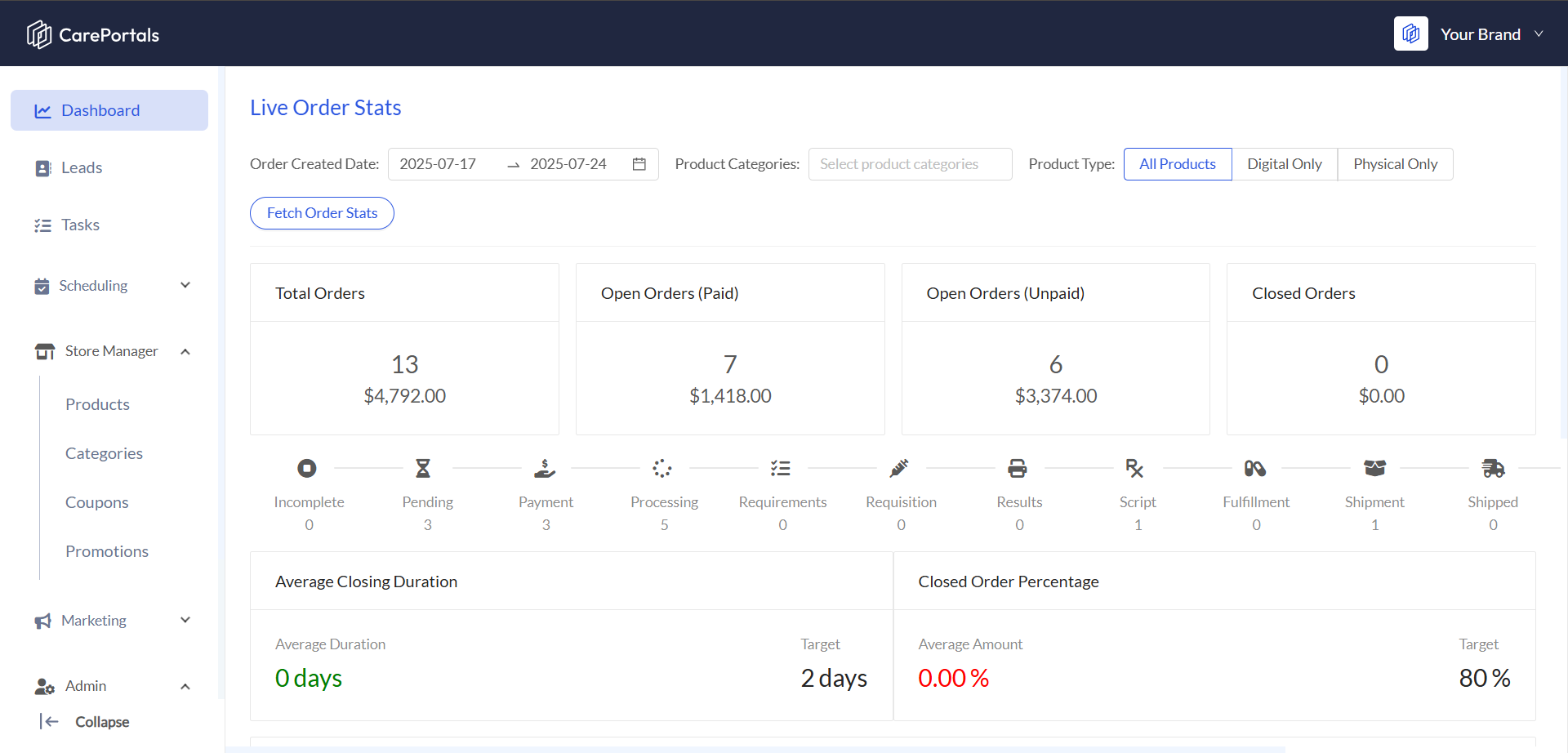
The dashboard is designed to give you a real-time, high-level overview of your entire order ecosystem. It provides instant insights into sales performance, operational workload, and potential bottlenecks, allowing you to make informed decisions quickly. Find below the key dashboard features explained.
High-Level KPI Cards
At the very top, you'll find four critical Key Performance Indicators (KPIs) that summarize the health of your business for a selected time frame:
Total Orders: This shows the total number of orders received and their combined monetary value. It's your primary indicator of overall sales volume.
Open Orders (Paid): These are active orders that customers have already paid for. This number represents your immediate workload and fulfillment obligations.
Open Orders (Unpaid): This card tracks orders that have been created but not yet paid for. It's a crucial metric for identifying potential revenue that may require a follow-up or payment reminder.
Closed Orders: This displays the number and value of all successfully completed orders (Completed, Shipped, Refunded, or Cancelled).
The Order Workflow Pipeline
This is a visual tool that shows you exactly where every open order is in the fulfillment process. Each stage in the pipeline, from Pending to Shipped, has a number indicating how many orders are currently in that status. This allows you to:
Instantly Spot Bottlenecks: If you see a large number of orders piling up in one stage (e.g., "Processing"), you know exactly where your team needs to focus its efforts.
Track Progress Visually: It provides a clear, intuitive view of your entire operational flow, making it easy to understand your team's capacity and current workload.
Performance & Goal Tracking
Located at the bottom of the dashboard, these two gauges measure your team's efficiency against the goals you've set:
Average Closing Duration: This metric calculates the average time it takes to move an order from creation to Closed. In our system, an order is considered closed if it has one of the following statuses: Completed, Shipped, Refunded, or Cancelled. It's a direct measure of your team's speed and efficiency. The gauge shows your current average against your target, instantly telling you if you're on track.
Closed Order Percentage: This represents the percentage of total orders (within the selected date range) that fall into one of those closed statuses. This is a key indicator of your overall completion rate and operational success, measured against your target percentage.
Performance Metric Targets are set to 2 days and 80% by default.
Powerful Data Filtering
To get more granular insights, the dashboard includes robust filtering options. You can drill down into your data by:
Order Created Date: Analyze performance for specific periods like last week, last month, or a custom date range.
Product Categories: Isolate and review orders for a specific line of products.
Product Type: Focus on the performance of individual product types such as All Products, Digital Only, or Physical Only.
Next Steps
Now that you’ve learned how the dashboard can be useful for you, we suggest reading these pages.
Understanding Promotions vs Coupons: Learn about the differences between the Promotions and Coupons features in the Store Manager.
How to Create a Product (One-Time and Subscription): Get step-by-step instructions for adding a new product in the Store Manager.
Was this helpful?
Still need help? Ask the team