How to Link a Prescription to an Order
Linking a prescription (Rx) to an order in CarePortals is known as fulfillment. In most cases, this step is fully automated. The system receives a prescription from a provider and automatically links it to the matching patient order.
Sometimes, an order remains in the Awaiting Fulfillment status for too long, which may mean the prescription was received but did not link automatically. In such a scenario, you may need to link it manually.
Step-by-step Process
Find below the steps to link a prescription to an order manually:
You can access the Fulfillment option from two main locations in the EMR Portal:
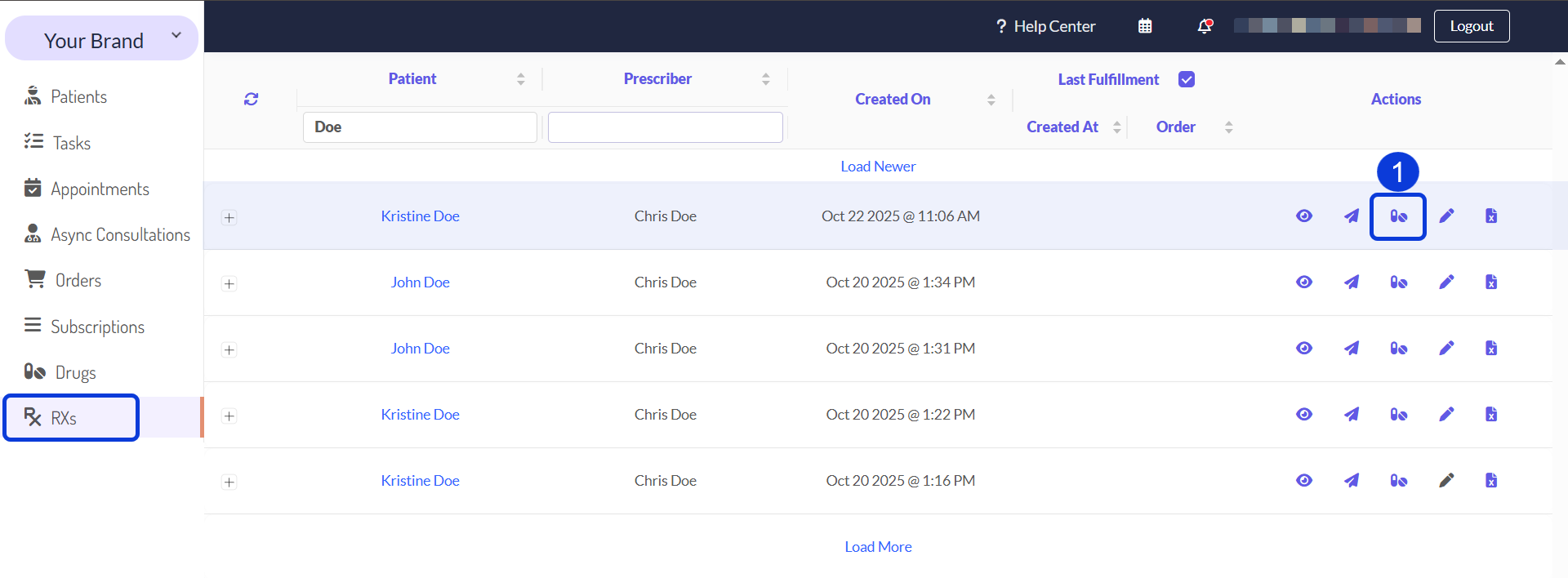
Go to the Prescriptions (RXs) manager, find the prescription in the list, and select Open Fulfillment (drug icon) from the Actions column.
Alternatively, you can access this from within the specific patient's profile: Navigate to the Prescriptions (Rx) tab, find the prescription, and select the Fulfill Order (drug icon) option.
A window will open. Click the Find Order button to search for the order you want to link the prescription to.
Select the correct order from the list by clicking the check mark next to it, then click Choose Order.
You must now enter the amount of medication to dispense for this order. The screen shows the authorized amount ("mitte") and the remaining amount ("REM"). Enter the correct quantity (e.g., "1") in the Dispense field.
Click Save and Close.
A confirmation message will appear asking if you want to update the order status to Awaiting Shipment. Click Yes to proceed with this update. This will automatically send the order to the assigned pharmacy if an integration is set up.
After completing these steps, the prescription is successfully linked. You will see the order number appear in the Order column for that prescription, and the Last Fulfillment column will update with the current time.
Next Steps
Now that you understand how to manually link a prescription to an order, explore these related guides to see how prescriptions fit into the bigger picture.
How to Create a Prescription: Learn how to manually create a prescription.
Drugs Management: Learn about how to manage the list of all available drugs that can be prescribed.
The Patient & Order Journey on CarePortals: Get a high-level overview of the entire order lifecycle, from initial purchase to final shipment.