Refills
Refills make it easier for patients to continue their medication without needing a new provider visit each time. This guide walks you through how refills work in CarePortals, whether you’re manually creating a new order or using the automated subscription feature.
Key Terms
First, let's go over a few common terms you'll see in the system:
Prescription (Rx): The providers’ official authorization for a patient to receive a specific medication.
Refill: A renewal of the original prescription that allows a patient to receive additional doses without another provider visit. Refills can be processed manually or automatically through subscriptions.
Order: The specific transaction for a patient's medication. A new order is always created for each shipment, whether it's an initial purchase or a refill.
Subscription: The automated plan a patient is enrolled in to receive their medication at scheduled intervals, usually every month.
Automatic Refills (Subscription-Based)
This is the most common way refills are handled and is designed to run automatically for patients with an active subscription. Here are the steps the system follows:
First, the patient's subscription plan automatically creates a new order when it's time for their next shipment. This new order is what triggers the refill process.
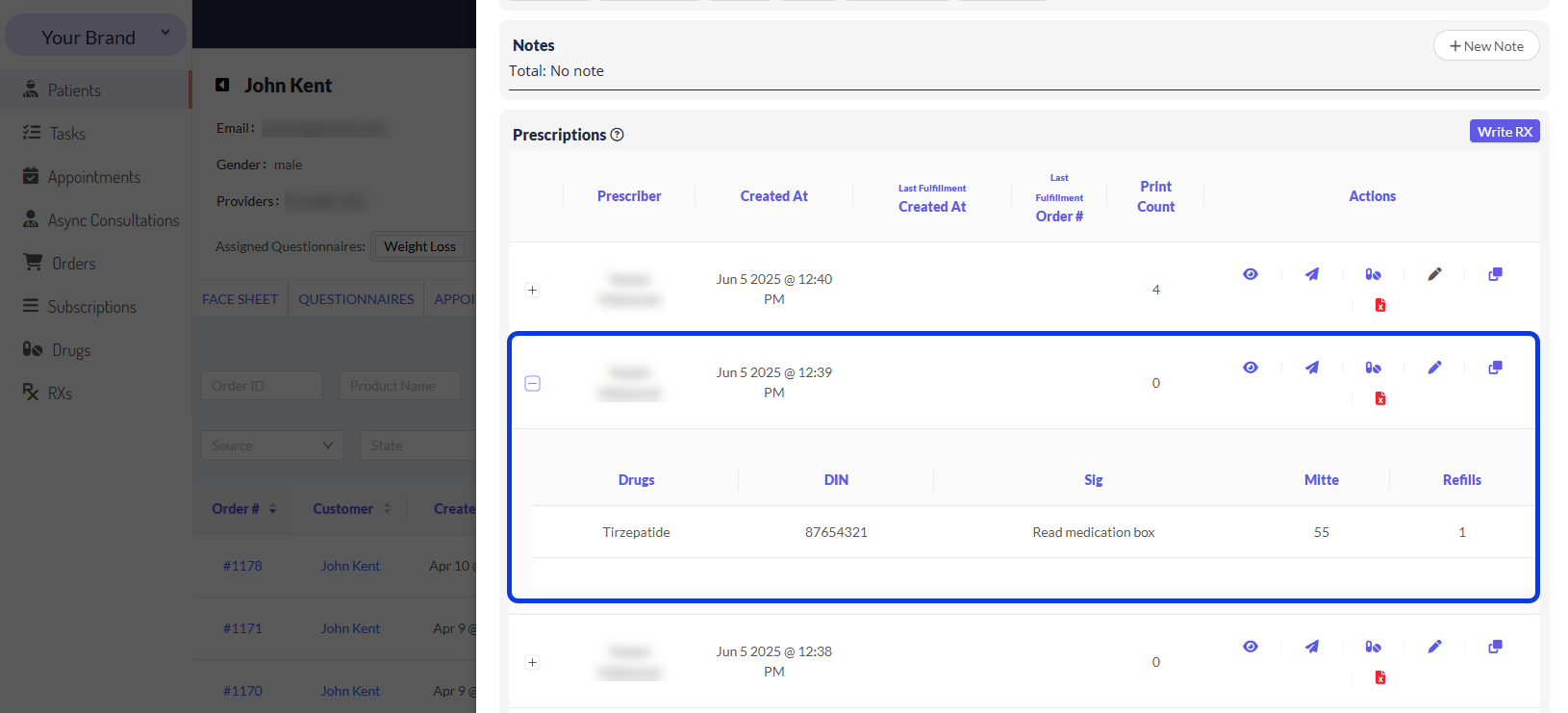
The system then looks at the patient's latest prescription to see how many refills are left. The number of refills left determine the system behavior:
(Refills > 0) If the patient has 1 or more refills available:
The system knows a new doctor's visit isn't needed.
It will skip the Awaiting Script status and move the order directly to the Awaiting Fulfillment stage to get it ready.
The system will automatically use one of the refills, and reduce the prescription refills by one.
(Refills = 0) The patient has zero refills available.
The system knows it's time to get a new prescription from the doctor.
The order will move to the Awaiting Script status, and a request will be sent to the provider.
Manually-Started Refills
A manual refill creates a new medication order for a patient who is not on an automated subscription plan. It is initiated on-demand, either by the patient or a member of the provider's team.
A request can be initiated from three sources:
A patient can request a refill from their patient portal, which initiates a new order.
A patient can request a refill via chat. A team member must then create the new order on the patient's behalf.
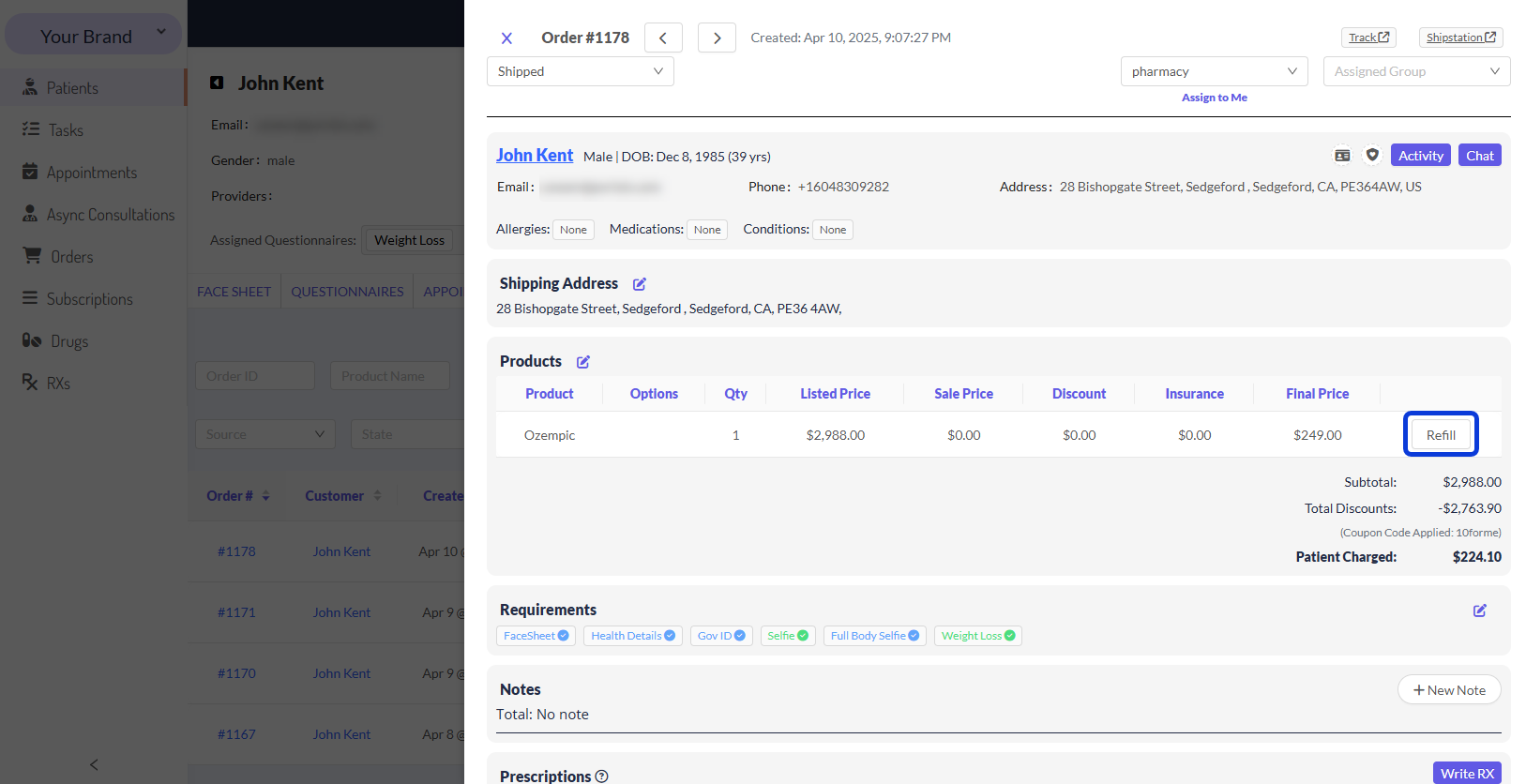
EMR (Provider-Initiated): A team member can click the Refill button on a previous order within the EMR. The system will automatically log the new order's source as
manual_refill.
Once a manual refill is initiated, the system immediately attempts to charge the patient's payment method on file.
If the payment is successful: The order is processed for fulfillment.
If the payment fails: The order is created but placed in Awaiting Payment status. The order will not be fulfilled until the payment issue is resolved.
In case there is no payment method on file for the patient, the order status will be Pending.
Frequently Asked Questions (FAQ)
Find here common questions you may have when dealing with refills.
Does a refill create a new order?
Yes, a new order must be created for any medication to be refilled or purchased. This new order can be created manually or automatically via a subscription.
What happens when a prescription runs out of refills?
Once a prescription has zero refills, it cannot be used again. The patient must have a new visit with a doctor to obtain a new prescription for any future orders. The old prescription is not updated; a new one must be written.
Can a refill be processed without an active subscription?
An automatic refill cannot. Even if a prescription has many refills remaining, the system will not create an automatic refill order if the patient's subscription is not active. The patient would need to request a manual refill instead.
Related Articles
Now that you understand the difference between manual and automatic refills, you can dive deeper in our guides.
The Patient & Order Journey on CarePortals: Learn about the standard, automated journey an order takes from the moment it's created to when it's shipped.
How to Manage Patients' Subscriptions: Since subscriptions are the engine behind automatic refills, it's important to know how they work. This guide covers the critical role subscriptions play in creating recurring orders and how to approach situations that may require you to manage a patient's subscription plan.
Was this helpful?
Still need help? Ask the team