GTM: Patient Portal DataLayer Events
Our platform, across both the e-commerce Cart and the Patient Portal, uses the dataLayer to signal key user actions, such as adding an item to the cart or completing an order.
The dataLayer serves as a centralized event stream that tools like Google Tag Manager (GTM) can monitor. GTM listens for these custom events and, when triggered, it can fire tracking tags to send event data to tools like Google Analytics, Meta Pixel, or other third-party platforms.
This enables you to capture behavioral insights, track conversions, and power marketing automation, all without modifying your site’s core code.
Understanding the dataLayer
The dataLayer is a JavaScript array used to pass information from your website or web app to Google Tag Manager (GTM) and other analytics tools. It acts as a shared data layer for GTM between the platform and any tracking or marketing tags you’ve configured.
In modern web applications—especially e-commerce and telehealth platforms like CarePortals—tracking the user journey accurately is essential. The dataLayer allows you to decouple event tracking from your codebase, making it easier to:
Manage all your marketing and analytics tags in one place.
React to user actions like product views, cart updates, or checkouts.
Send relevant data to multiple services without duplicating logic.
How It Works
The process follows a simple, three-step flow that decouples website development from marketing and analytics management.
A user performs a key action on the site (e.g., clicks "Add To Cart").
The website's code pushes a JavaScript object with event details into the
dataLayer.GTM detects the push, matches the event name to a configured trigger, and fires the corresponding tags (e.g., a Google Analytics 4 event tag).
Key Events & Data
Here are the primary custom events pushed to the dataLayer, along with the data parameters included with each one. These event and parameter names are based on Google Analytics 4 recommended standards.
Event 1: Signup
This event fires when a patient creates an account through the Patient Portal. It helps you track new patient registrations and identify when a user accesses the patient portal experience for the first time.
{
  event: "interaction",
  gtm: {
    uniqueEventId: 50,
    start: 1781744640806,
    scrollThreshold: 90,
    scrollUnits: "percent",
    scrollDirection: "vertical",
    triggers: "15",
    priorityId: 7,
  },
  action: "signUp",
  label: "signUp",
  page_location: "https://brand.yourdomain.com/auth/signup?gtm_debug=178" +
                 "1744640375",
  page_path: "/auth/signup?gtm_debug=1781744640375",
  page_title: "Sign Up | Your Brand",
  page_referrer: "https://tagassistant.google.com/",
  is_initial_load: true,
  eventCallback: "Function",
  eventTimeout: 2000,
  target: "accounts",
  email: "patient@portals.care",
  userId: "6a3344245cef16577243db4e"
}
Event 2: Login
The login event fires when an existing patient signs in through the Patient Portal. It helps you track returning user activity and understand how often patients access their accounts.
{
  event: "interaction",
  gtm: {
    uniqueEventId: 50,
    start: 1781744640806,
    scrollThreshold: 90,
    scrollUnits: "percent",
    scrollDirection: "vertical",
    triggers: "15",
    priorityId: 7,
  },
  action: "login",
  label: "login",
  page_location: "https://brand.yourdomain.com/auth/signup?gtm_debug=178" +
                 "1744640375",
  page_path: "/auth/login?gtm_debug=1781744640375",
  page_title: "Log In | Your Brand",
  page_referrer: "https://tagassistant.google.com/",
  is_initial_load: true,
  eventCallback: "Function",
  eventTimeout: 2000,
  target: "accounts",
  email: "patient@portals.care",
  userId: "6a3344245cef16577243db4e"
}
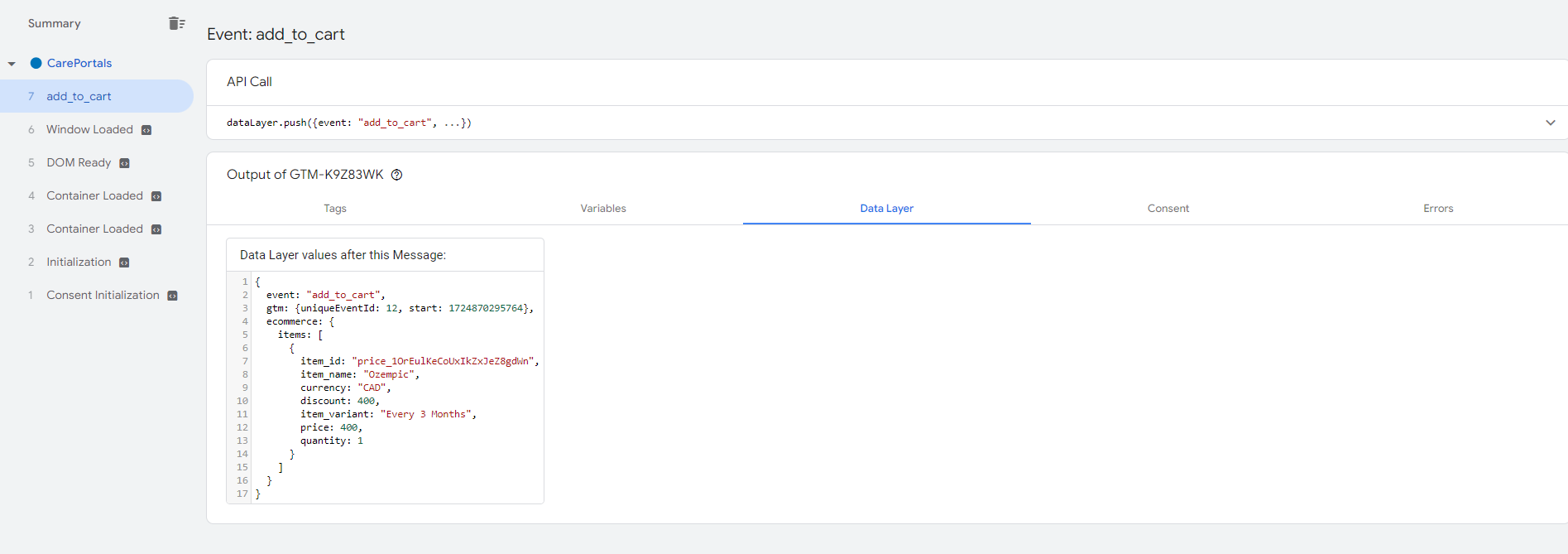
Event 3: Add to Cart
This event fires when a user clicks the "Add to Cart" button. It's used to track interest in specific products. The GTM trigger should be configured to listen for the event name add_to_cart.
Event 4: Checkout Started
This event fires when a user initiates the checkout process and is a key step for identifying cart abandonment. This is a general interaction event, and the specific action is identified by the action variable. A GTM trigger should use both the Event Name and the Action Name.
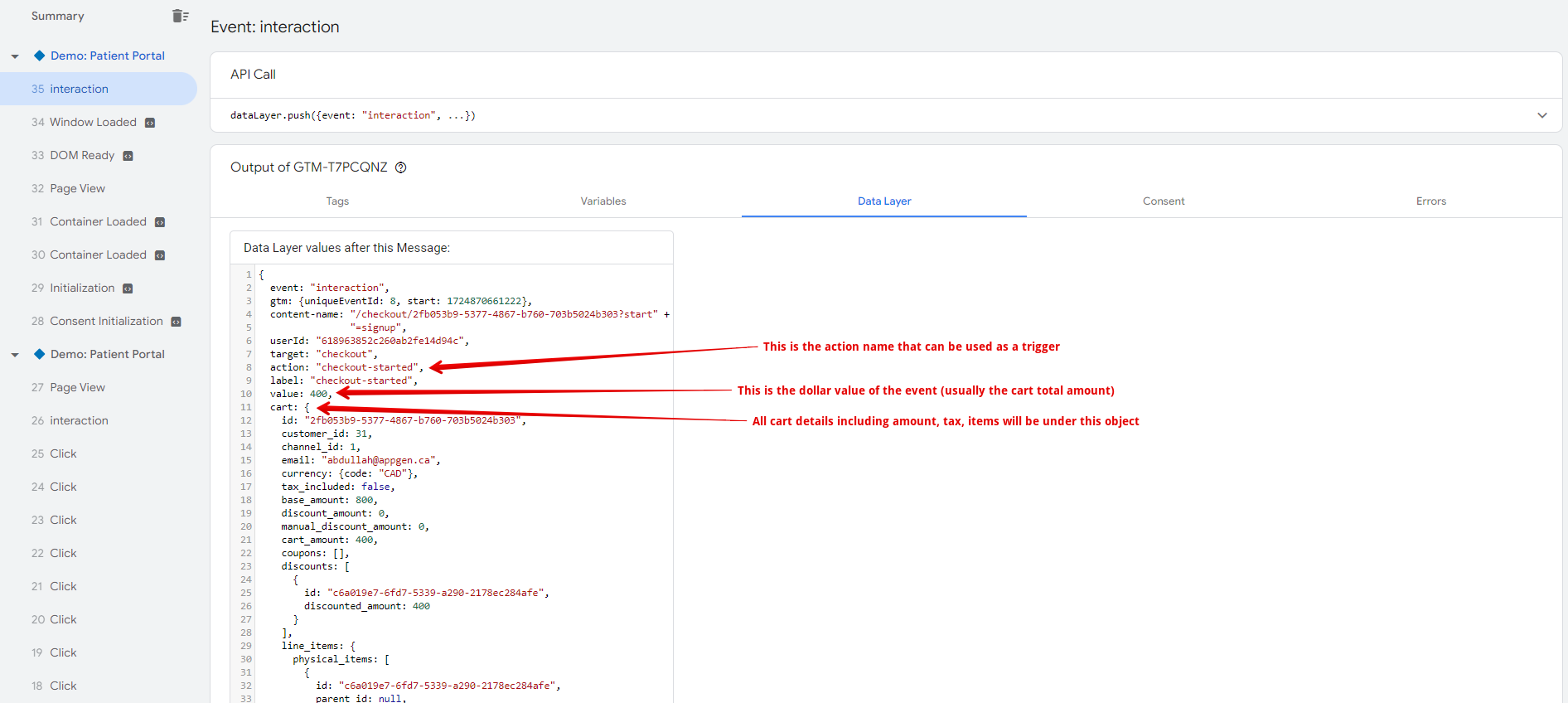
The following event payload is an example of what the system provides.
{
  "event": "interaction",
  "gtm": {
    "uniqueEventId": 10,
    "start": 1755744027548
  },
  "content-name": "/checkouts/6892440ec22275ddbed9d901?start=signup",
  "userId": "66bb23c50e63205ef5ab53ee8",
  "target": "checkout",
  "action": "checkout-started",
  "label": "checkout-started",
  "value": 249,
  "cart": {
    "id": "6892440ec6y2275ddbed9d901",
    "organization": "Your_Brand",
    "lineItems": [
      {
        "id": "96ShLeK-",
        "listPrice": 1200,
        "name": "Ozempic",
        "description": "Auto-renewed at $1300",
        "variantId": null,
        "price": 249,
        "listPrice": 1199,
        "salePrice": 1001,
        "price": 1001,
        "visitFee": 129,
        "shippingFee": 0,
        "quantity": 1,
        "optionId": null,
        "optionLabel": null,
        "optionType": null,
        "productId": "67172at990f23dc0100af20b",
        "contradictingProducts": [],
        "url": "",
        "isSubscription": true,
        "subscriptionPhases": [
          {
            "price": 249,
            "cycles": "1",
            "requirements": [
              { "type": "qnr", "key": "facesheet" },
              { "type": "qnr", "key": "govId" },
              { "type": "qnr", "key": "selfie" },
              { "type": "qnr", "key": "wlus" }
            ],
            "fillingCycleInterval": 1,
            "fillingCycleUnit": "month",
            "billableCycleInterval": 1
          },
          {
            "price": 299,
            "cycles": 0,
            "requirements": [
              { "type": "qnr", "key": "wlProgress" }
            ],
            "fillingCycleInterval": 1,
            "fillingCycleUnit": "month",
            "billableCycleInterval": 1
          }
        ],
        "extras": {
          "bigcommerceId": null,
          "stripePriceId": null
        },
        "type": "physical",
        "options": [],
        "relatedProducts": [
          {
            "displayName": "1 month",
            "images": [],
            "price": 199,
            "listPrice": 299,
            "productId": "673b8c6d91ce4849699ae1db",
            "relationType": "variant",
            "variantId": null
          },
          {
            "displayName": "Vitamin B",
            "images": [],
            "price": 1200,
            "listPrice": 1200,
            "productId": "6775779bdq5adw324a4eb8d2",
            "relationType": "crossSell",
            "variantId": null
          },
          {
            "displayName": "Vitamin C",
            "images": [],
            "price": 10,
            "listPrice": 12,
            "productId": "6868146d83baca0131233ef4",
            "relationType": "crossSell",
            "variantId": null
          }
        ],
        "subLabel": "3-months",
        "categories": []
      }
    ],
    "paymentIntentId": null,
    "createdAt": "2025-08-05T17:49:02.029Z",
    "updatedAt": "2025-08-21T02:39:47.170Z",
    "__v": 0,
    "customer": "66bbbc52363205efyyb53ee8",
    "baseAmount": 1200,
    "subTotalAmount": 249,
    "totalAmount": 249,
    "discountAmount": 0,
    "postPurchaseCredit": 0
  },
  "items": [
    {
      "item_name": "Ozempic",
      "quantity": 1,
      "price": 1200
    }
  ]
}
Event 5: Order Created (Purchase)
This event fires when a user successfully completes a purchase and is the primary event for tracking conversions and revenue. The trigger in GTM should look for the event name interaction combined with the action value of order-created.
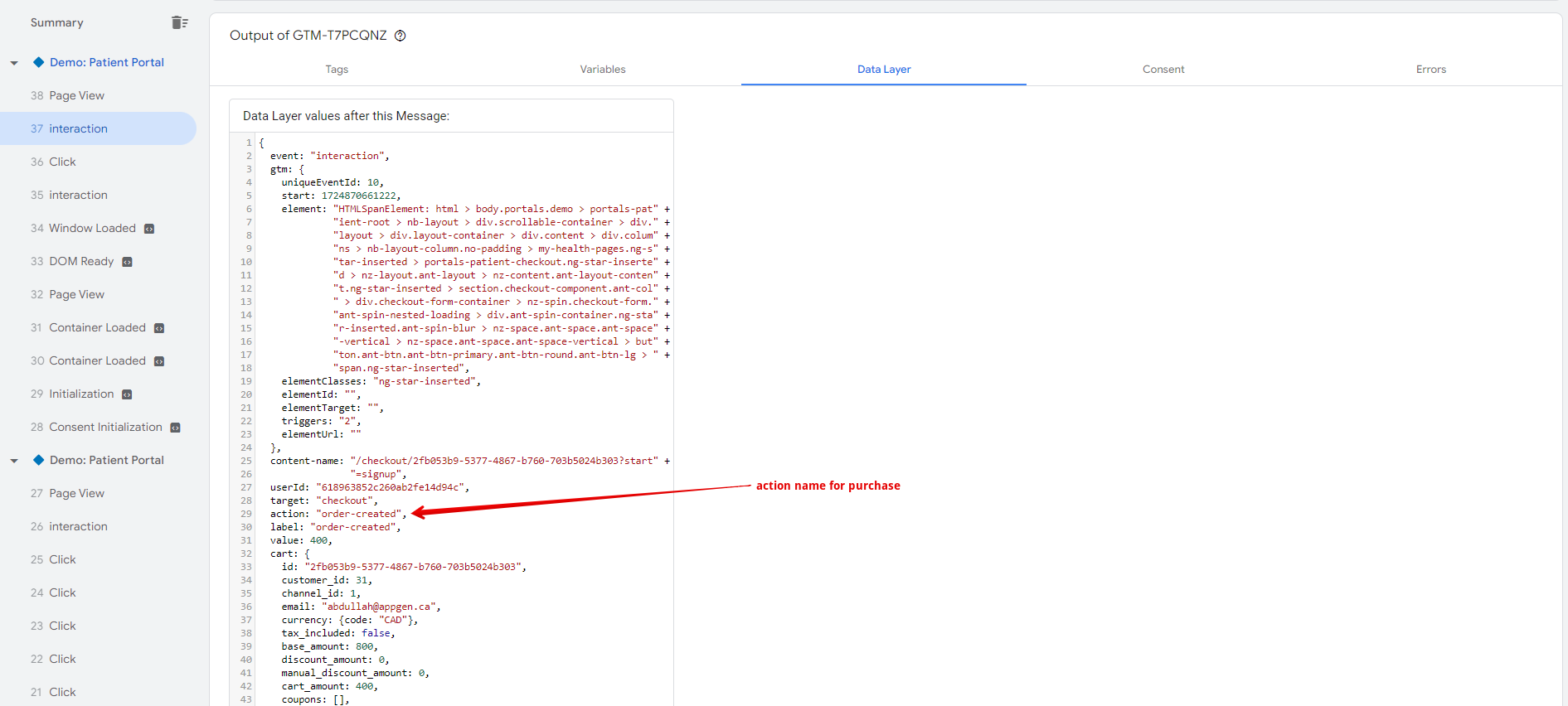
The following event payload is an example of what the system provides.
{
  "event": "interaction",
  "gtm": {
    "uniqueEventId": 23,
    "start": 23457993822330
  },
  "content-name": "/checkouts/6892440ec22275ddbed9d901?start=signup",
  "userId": "66bbbc50e632ddef5ab53ee8",
  "target": "checkout",
  "action": "order-created",
  "label": "order-created",
  "value": 249,
  "cart": {
    "_id": "6892440eczzz75ddbed9d901",
    "organization": "yourBrand",
    "lineItems": [
      {
        "id": "96ShLeK-",
        "listPrice": 1200,
        "name": "Ozempic",
        "description": "Auto-renewed at $300 123123",
        "variantId": null,
        "price": 249,
        "quantity": 1,
        "optionId": null,
        "optionLabel": null,
        "optionType": null,
        "productId": "67172a5we0f2edc0100af20b",
        "contradictingProducts": [],
        "url": "",
        "isSubscription": true,
        "subscriptionPhases": [
          {
            "price": 249,
            "cycles": "1",
            "requirements": [
              { "type": "qnr", "key": "facesheet" },
              { "type": "qnr", "key": "govId" },
              { "type": "qnr", "key": "selfie" },
              { "type": "qnr", "key": "wlus" }
            ],
            "fillingCycleInterval": 1,
            "fillingCycleUnit": "month",
            "billableCycleInterval": 1
          },
          {
            "price": 299,
            "cycles": 0,
            "requirements": [
              { "type": "qnr", "key": "wlProgress" }
            ],
            "fillingCycleInterval": 1,
            "fillingCycleUnit": "month",
            "billableCycleInterval": 1
          }
        ],
        "extras": {
          "bigcommerceId": null,
          "stripePriceId": null
        },
        "type": "physical",
        "options": [],
        "relatedProducts": [
          {
            "displayName": "1 month",
            "images": [],
            "price": 199,
            "listPrice": 299,
            "productId": "673b8c6d90c1q149b98ae1db",
            "relationType": "variant",
            "variantId": null
          },
          {
            "displayName": "Vitamin B",
            "images": [],
            "price": 1200,
            "listPrice": 1200,
            "productId": "6775779bd8io90324a4eb8d2",
            "relationType": "crossSell",
            "variantId": null
          },
          {
            "displayName": "Vitamin C",
            "images": [],
            "price": 10,
            "listPrice": 12,
            "productId": "6868146d8wwwwa013ab33ef4",
            "relationType": "crossSell",
            "variantId": null
          }
        ],
        "subLabel": "3-months",
        "categories": []
      }
    ],
    "paymentIntentId": null,
    "createdAt": "2025-08-05T17:49:02.029Z",
    "updatedAt": "2025-08-21T02:39:47.170Z",
    "__v": 0,
    "customer": "66bbbc50e632123f5ab53ee8",
    "baseAmount": 1200,
    "subTotalAmount": 249,
    "totalAmount": 249,
    "discountAmount": 0,
    "postPurchaseCredit": 0
  },
  "items": [
    {
      "item_name": "Ozempic",
      "quantity": 1,
      "price": 1200
    }
  ],
  "orderId": 1463,
  "order": {
    "organization": "appgen_demo",
    "id": 1463,
    "customer": {
      "_id": "66bbbc50e63205ef12353ee8",
      "email": "yaseen@portals.care",
      "phone": "+16048309282",
      "firstName": "John",
      "lastName": "Kent"
    },
    "status": "pending",
    "statusHistory": [],
    "meta": {
      "cartId": "6892440ec22275d12349d901"
    },
    "source": "checkout",
    "lineItems": [
      {
        "name": "Ozempic",
        "subLabel": "3-months",
        "productId": "67172a512342edc0100af20b",
        "variantId": null,
        "listPrice": 1200,
        "salePrice": 249,
        "price": 249,
        "quantity": 1,
        "isSubscription": true,
        "type": "physical",
        "requirements": [
          { "type": "qnr", "key": "facesheet" },
          { "type": "qnr", "key": "govId" },
          { "type": "qnr", "key": "selfie" },
          { "type": "qnr", "key": "wlus" }
        ],
        "extras": {
          "bigcommerceId": null,
          "stripePriceId": null
        },
        "categories": []
      }
    ],
    "shippingAddress": {
      "address1": "28 Bishopgate Street, Sedgeford",
      "address2": "",
      "city": "Sedgeford",
      "provinceCode": "CA",
      "postalCode": "PE36 4AW"
    },
    "coupon": "",
    "invoices": [],
    "totalAmount": 249,
    "discountAmount": 0,
    "baseAmount": 1200,
    "subTotalAmount": 249,
    "requirements": [],
    "version": 2,
    "isDeleted": false,
    "creditUsedAmount": 0,
    "postPurchaseCredit": 0,
    "_id": "68a68731234185504107f65",
    "createdAt": "2025-08-21T02:41:03.966Z",
    "updatedAt": "2025-08-21T02:41:03.966Z",
    "__v": 0,
    "hasUnsatisfiedQnrRequirements": true,
    "hasUnsatisfiedVerificationRequirements": false
  }
}
By implementing this system, analytics and marketing tags can be managed entirely within Google Tag Manager, creating a flexible and scalable tracking solution without requiring new code deployments for simple tag changes.
Related Articles
Want to learn more? Check out these related articles for deeper setup tips and advanced customizations.
Set up Tracking Scripts: Add scripts to monitor and analyze user activity.
How to Embed the CarePortals Cart: Step-by-step guide to add the cart to your site.
Skip the Cart: Set Up a Buy Now Button for Instant Checkout: Let users skip the cart and checkout instantly.
Was this helpful?
Still need help? Ask the team