Understand the Patient Referral Program
The Patient Referral Program helps you expand your patient base by rewarding existing patients for inviting friends and family. This guide covers how the program works, and how credits are applied and configured.
Using the Referral Link
You do not need to manually generate a referral link. The system handles this process automatically for every patient.
Here is how the unique referral link functions and how it is used:
Automatic Assignment: The system automatically assigns a unique referral link to each patient. There is no "generate" button required for the patient or the administrator.
Where to Find It: Patients can locate their unique link directly within their Patient Portal.
How to Use It: Patients simply copy this link and share it with friends or family.
Tracking: When a new patient clicks that link and signs up, the system automatically tracks them as a "referee" linked to the original patient. This connection ensures that once the new patient completes their first paid order, the credits are correctly applied to both accounts.
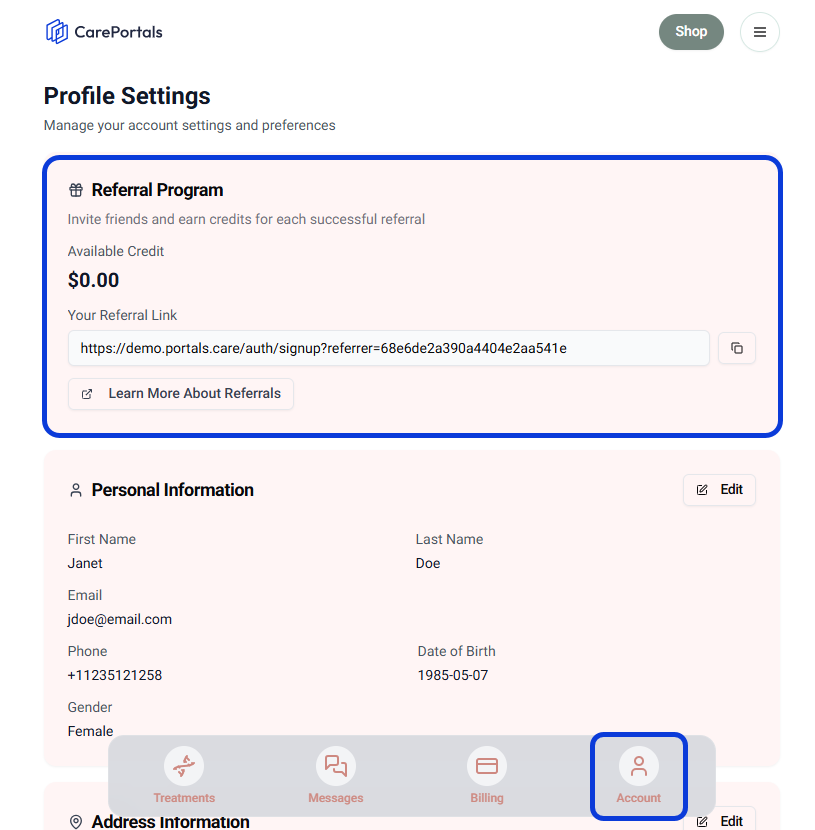
Customize the ‘Learn More’ link
You can link the ‘Learn More About Referrals’ link to a specific page on your website, such as a dedicated rewards page or your own terms for the referral program. Contact our support team to update this URL for your organization.
Credit Structure
The program is designed to reward both parties involved in the invitation. By default, the Referrer receives a $50 credit, and the Referee gets a $30 credit.
To change these credit amounts, please contact our support team (support@portals.care). We will configure the values to fit your specific needs.
Credit Application Rules
It is important to understand exactly when the system applies financial credit to patient accounts and the rules governing this process:
Credits are released immediately after the new patient (referee) successfully places and pays for their first order.
Once triggered, the system automatically applies the credit to the next paid order for both the referrer and the referee.
Next Steps
Now that you understand how referrals work, you might want to explore these related guides.
How to Create a Coupon: Discover other ways to offer incentives to your patients.
Create a Product (One-Time and Subscription): Learn the basic steps to create a new one-time purchase product and how to configure the different phases for a subscription-based product.
Was this helpful?
Still need help? Ask the team