Understanding Order Fulfillment
This guide explains how orders are processed in CarePortals. The entire process depends on one key factor: whether the product requires a prescription.
The Prescription Check
Every order for a prescription medication must pass a prescription check before it can be sent to a pharmacy. This rule applies to both one-time purchases and automated subscription refills. Each new order generated by the system is validated against a patient's prescription file to ensure it is medically authorized.
The Two Fulfillment Paths
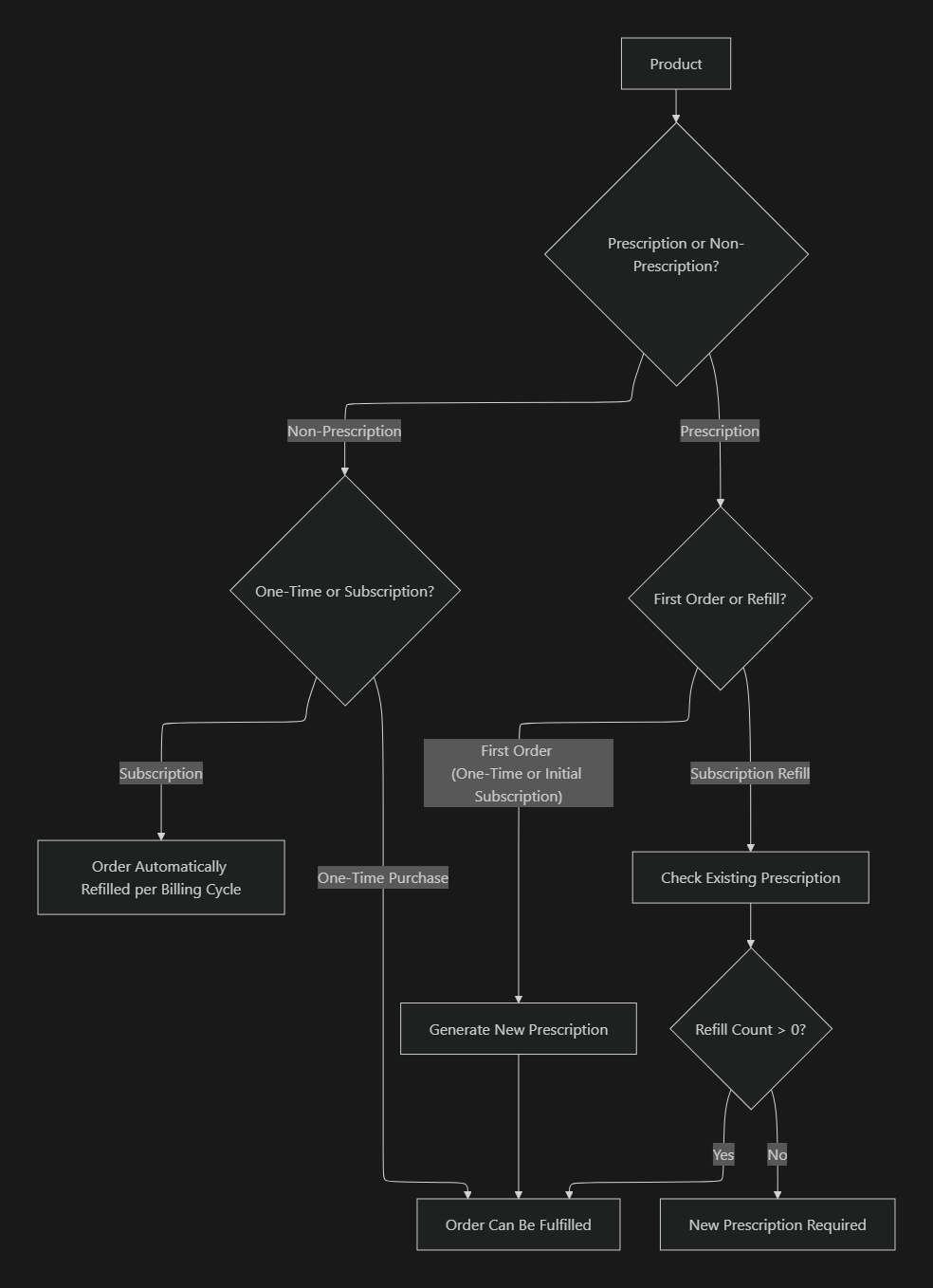
The flowchart below illustrates how a product order follows one of two paths based on its prescription requirement.
Path 1: Prescription Products
The fulfillment process for prescription products depends on whether it is a first-time order or an automated subscription refill.
First-Time Orders (One-Time Purchase or Initial Subscription) A first-time order always requires a new prescription. The patient must complete all necessary requirements, such as medical intake forms, so a healthcare provider can evaluate them. If the patient is eligible, the provider writes a new prescription that is linked to the order, allowing it to be fulfilled.
Subscription Refills For automated orders generated by a subscription renewal, the system checks the patient's last valid prescription to see if it has available refills.
If refills are available (
Refill Count > 0): The order is approved for fulfillment, and the refill count on the prescription is reduced by one.If no refills are available (
Refill Count = 0): The order is put on hold. A new consultation and prescription are required before fulfillment can continue.
Example
A patient is on a monthly subscription for Semaglutide, a prescription medication. The first month's order generates a new prescription. For the second month's automated refill, the system checks that prescription. If it has refills left, the order is sent to the pharmacy. If the refills have run out, the order is paused until the patient consults a provider and gets a new prescription.
Path 2: Non-Prescription Products
Orders for non-prescription items, like supplements or other wellness products, do not require a medical check and are processed directly for fulfillment.
One-Time Purchase: The order is sent directly to the pharmacy to be fulfilled.
Subscription: The initial order is fulfilled immediately. Afterward, a new order is automatically created and fulfilled at the start of each billing cycle.
Example
A patient buys a Skin Glow Pack on a monthly subscription. The first order is fulfilled right away. Each month after that, a new order for the pack is automatically created and shipped without any need for prescription checks.
Related Articles
We recommend exploring the following guides to get a complete understanding of how to make the most of the platform.
Managing Orders in CarePortals: Get a comprehensive view of all patient orders and the key features available to manage them.
The Patient & Order Journey on CarePortals: Get a high-level overview of the entire order lifecycle, from initial purchase to final shipment.
Subscriptions Overview: Learn how to create a subscription plan for a product.
How to Create an Order or Subscription Manually: Learn how to manually create a new one-time order or a recurring subscription for a patient.
Was this helpful?
Still need help? Ask the team