Subscriptions Overview
CarePortals’ built-in Subscriptions feature makes it easy to manage recurring product plans. Ideal for automating medication refills, subscriptions can be customized into phases, each with its own pricing, billing cycle, and requirements.
Subscription Information
You have two ways to access Subscriptions:
From your EMR portal, navigate to Subscriptions.
From a patient’s profile, head to the Subscriptions tab.
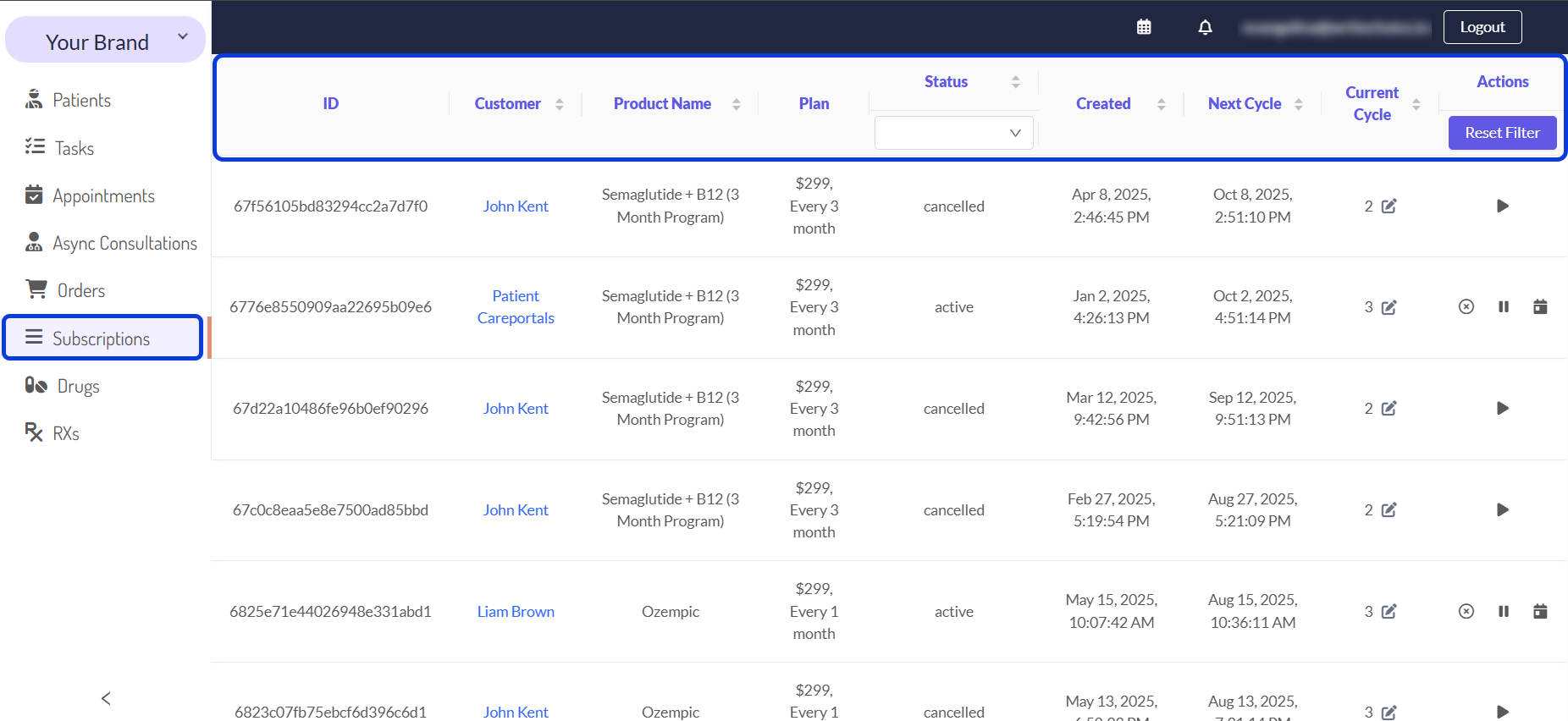
Once you open the Subscriptions list, you will have access to the following information:
Searching and Sorting the Subscriptions List
You can find Subscription plans by sorting the list or using the available filters.
To sort, click any column header.
To filter, select any of the possible statuses: Active, Paused, Cancelled, or Ended.
To clear all active filters, click the refresh icon (🔄).
Next Steps
Now that you understand more about Subscriptions, explore these related guides:
Consultations Overview: See where to find the medical intake forms and any treatment requirements that patients submit.
Orders Manager: Get a comprehensive view of all patient orders and the key features available to manage them.
Subscriptions Overview: Learn how to manage subscriptions for your products.
Was this helpful?
Still need help? Ask the team