How to Manage the Patient Watchlist
Monitoring patient interactions is crucial for providing the proper care at the right time. The Watchlist feature in the EMR Portal keeps your team informed about specific patients without requiring manual profile checks, ensuring active or sensitive conversations receive timely attention.
This guide explains how to view the current watchlist, add yourself or colleagues to receive alerts, and remove users from the list.
Manage the Watchlist
Check if you or another team member are currently watching a patient.
Navigate to the Patients section in the EMR Portal.
Open the specific Patient Profile you wish to check.
Look for the Watchlist icon (an eye symbol) located in the header of the profile.
Click the icon to open the Manage Patient Watchlist window.

🔔 Notification Center
When a team member is on a patient’s watchlist, they receive alerts directly in the Notification Center (the bell icon located next to the user email) whenever that patient sends a new message.
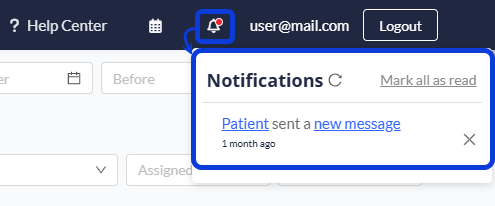
Inside the notification, you have two options for quick access:
Clicking on the Patient's Name takes you directly to the patient's profile record.
Clicking on the new message link opens the patient's record and displays the specific message.
Adding or Removing Watchers
Once the Manage Patient Watchlist window is open, you can adjust who receives notifications for this patient.
See Current Watchers: The window displays a list of all users currently watching the patient.
Add a Watcher: Search for a team member's name and select them to add them to the list. You can add yourself or assign it to a colleague.
Remove a Watcher: Click the remove icon next to a name to stop them from receiving notifications for this patient.
In the patient chat window, you may also see options like Send & Watch. This lets you send a message and automatically add yourself to the watchlist in a single step.
Next Steps
Now that you know how to manage the patient watchlist, we recommend that you read the following articles:
How to Use the Patient Chat: Learn the functions within the chat, including sending messages and forwarding conversations.
How to Find and Manage a Patient's Profile: Master the search tools and navigation tabs within the EMR.
Was this helpful?
Still need help? Ask the team